GTA 6 Xbox auto upload bans are raising concerns, how capture uploads work, and how to adjust Xbox settings to protect your account. GTA 6 Xbox auto upload bans have become a concern among players after reports surfaced about Xbox accounts receiving temporary suspensions for automatically uploaded gameplay clips. The reports suggest that some captured scenes from Grand Theft Auto VI, including beach environments and mature in-game content, may trigger Xbox’s content moderation system when videos are uploaded to the Xbox Network. This has raised an important question for players: can simply recording GTA 6 gameplay put an Xbox account at risk? Understanding how automatic uploads work, what Xbox considers inappropriate content, and how to review capture settings can help players avoid unnecessary problems.
What Are GTA 6 Xbox Auto Upload Bans?
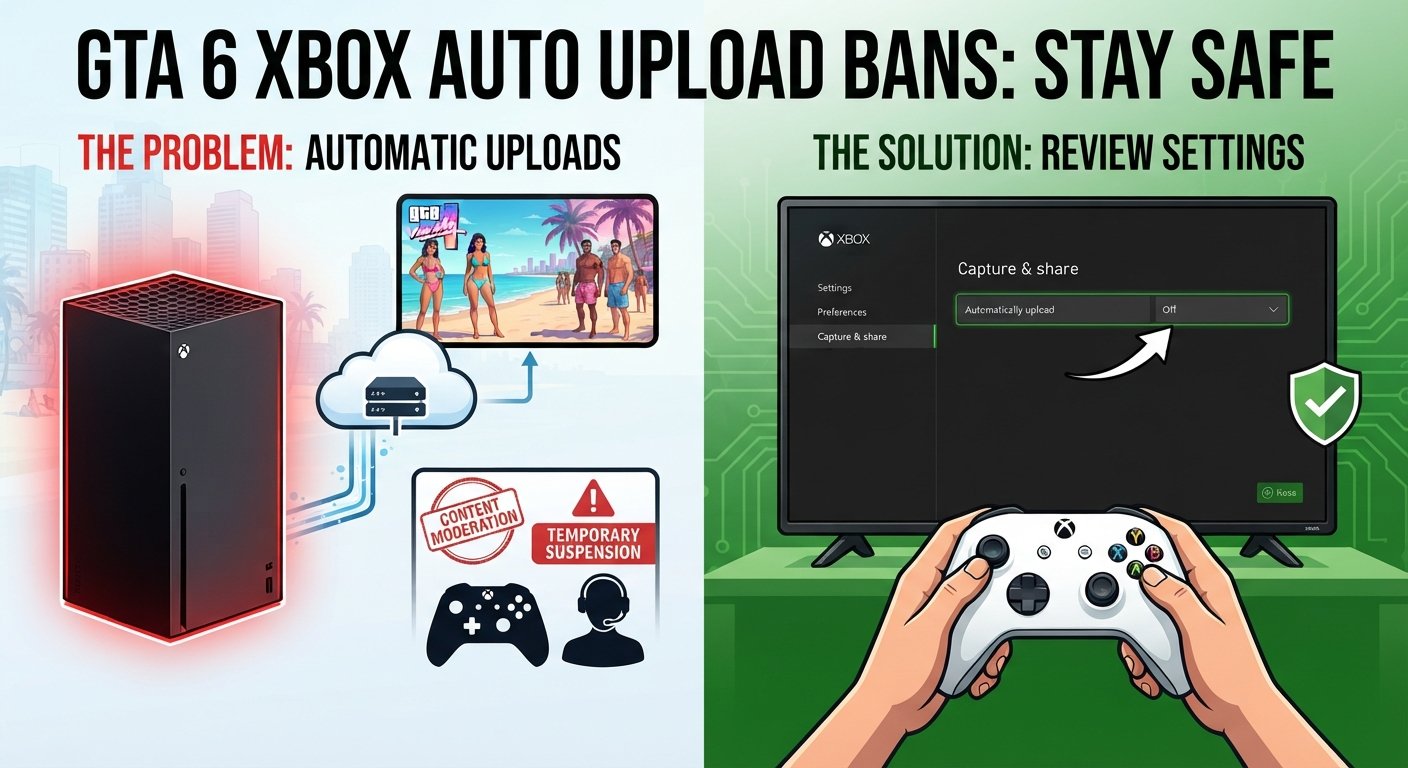
GTA 6 Xbox auto upload bans refer to reported Xbox account suspensions allegedly connected to gameplay screenshots and video clips that were automatically uploaded to Microsoft’s online services. The concern is not necessarily about playing GTA 6 itself. Instead, players are worried that content captured during normal gameplay could be reviewed by Xbox’s moderation system after being uploaded. Grand Theft Auto VI includes mature environments, adult-themed locations, beach scenes, and other content that may be considered sensitive under certain platform rules. When a console automatically shares a recording, players might not have an opportunity to review the footage before it reaches an online service.
Why Are Xbox Players Reporting GTA 6 Bans?
The reports have attracted attention because players generally expect their console recordings to be harmless unless they deliberately share something inappropriate. However, automatic uploading creates a different situation. A gameplay recording might contain scenes that a player considers ordinary parts of an open-world game, while an automated moderation system may evaluate the same footage differently. Some online discussions have mentioned short recordings containing beach scenes, NPC clothing, and mature environments. These reports have contributed to concerns about temporary suspensions, particularly when players believe they did not intentionally upload offensive material. It is important to remember that individual reports do not establish a confirmed widespread ban policy, and the exact circumstances behind every suspension may differ.
How Does Xbox Automatic Upload Work?
Xbox provides capture features that allow players to record gameplay, take screenshots, and share memorable moments. Depending on the console settings, certain captures can be uploaded automatically to online services instead of remaining only on the device. This feature is convenient because players can access their recordings later, share them with friends, or manage their gaming memories through supported services. The problem is that automatic uploads can remove the extra step of checking a recording before it becomes available online. If a clip contains material that violates platform content rules, it may attract moderation attention. Players who prefer greater control over their recordings can review the capture and sharing settings and disable automatic uploads where those options are available.
What GTA 6 Scenes Could Trigger Content Moderation?
Grand Theft Auto VI is an open-world action game designed around a fictional environment with adult themes. Its world includes different characters, locations, clothing styles, entertainment venues, and activities. Some of these elements may appear in automatically captured recordings. Although ordinary gameplay should not automatically be treated as a policy violation, the context and content of an uploaded clip can matter.
Beach Scenes and NPC Clothing
Beach environments are a natural part of the game’s fictional setting, and players may record these locations while exploring Vice City. However, some online reports have raised questions about recordings featuring NPCs wearing revealing clothing. A beach scene is not automatically inappropriate, but players should understand that platform moderation may assess the actual content of an uploaded recording rather than the player’s reason for capturing it.
Strip Clubs and Adult Entertainment Locations
GTA games are known for including adult-themed entertainment locations. GTA 6 continues the franchise’s mature approach to fictional environments. Players may accidentally capture footage from these locations while exploring or completing activities. Depending on what appears in the recording, such footage could raise moderation concerns if uploaded or shared through a platform that restricts sexually explicit material.
Mature Gameplay and Sensitive Content
Some recordings may contain other mature elements, including sexual references, nudity, or scenes that fall outside ordinary action gameplay. The distinction between mature video game content and prohibited shared content is important. A game’s age rating does not mean every possible screenshot or recording is automatically acceptable under Xbox’s sharing rules. Players should review the applicable community standards before uploading sensitive footage.
How to Turn Off Automatic Uploads on Xbox
Turning off automatic uploads is a practical precaution for players who want to control which recordings reach online services. It does not mean that GTA 6 gameplay recording must stop completely. Instead, the goal is to prevent captures from being shared automatically without the player’s knowledge.
Step 1: Open the Xbox Guide
Press the Xbox button on your controller to open the Guide menu. This menu provides quick access to your profile, settings, notifications, and capture features. From here, move to the Profile & system section to find the console settings.
Step 2: Open Settings
Select Profile & system and then choose Settings. The settings menu contains options for personal preferences, account management, privacy, and game capture. Take a moment to check the available options because menu names and layouts can change with system updates.
Step 3: Find Capture and Share
Look for Preferences and open the Capture & share section if it is available on your console. This area controls several recording and sharing features, including capture preferences and supported upload options. The exact wording may vary depending on your Xbox model and software version.
Step 4: Review Automatic Upload Options
Look for an automatic upload setting and check whether captures are being sent to the Xbox Network or another connected service. If your console provides a Don’t upload option, select it to prevent automatic sharing through that destination. Also review any separate cloud or OneDrive upload settings rather than assuming one change controls every service.
Step 5: Check Your Existing Captures
After changing the settings, review your existing recordings and screenshots. Disabling automatic uploads may not remove content that was already uploaded. Check your capture library and any connected storage services to understand what is currently stored online. If you find a recording you no longer want to share, use the available management options to remove it where supported.
Can You Still Record GTA 6 Gameplay After Disabling Auto Upload?
Yes, disabling automatic uploads does not necessarily prevent you from recording GTA 6 gameplay. Xbox capture features can still allow players to take screenshots and record clips, depending on their console settings and available storage. The main difference is that you have more control over what happens after a recording is created. Instead of relying on automatic sharing, you can review the footage first and decide whether it is appropriate to upload. This is particularly useful for players who regularly explore different locations, capture random encounters, or record gameplay without knowing exactly what will appear in the final clip.
Can Xbox Really Ban Players for Automatically Uploaded GTA 6 Clips?
Xbox can enforce its Community Standards when users share content that violates platform rules. However, the claim that every automatically uploaded GTA 6 clip can result in a ban is not established. A suspension depends on the content involved, the relevant policy, and the circumstances of the enforcement decision. Players should also distinguish between a report from another gamer and an officially confirmed moderation policy. A two-day suspension mentioned in an online discussion does not prove that every similar recording will receive the same punishment. If an account receives a suspension, the player should check the official enforcement notice for the specific reason and duration rather than relying on social media explanations.
What Should You Do If Your Xbox Account Gets Suspended?
Receiving a suspension can be frustrating, especially when you believe a recording was uploaded automatically and did not contain anything you intended to share. The first step is to avoid guessing about the reason. Xbox enforcement notices and the account’s enforcement history can provide more useful information about the action taken.
Check Your Enforcement History
Visit the official Xbox enforcement website and sign in with the affected account. Review the available enforcement information to understand whether the restriction involves communication, content sharing, multiplayer access, or another account feature. The exact restrictions depend on the enforcement action.
Read the Suspension Details
Check the stated duration and the policy category mentioned in the notice. A temporary restriction and a longer account suspension are not the same thing. Understanding the specific action will help you decide what to do next.
Submit an Appeal If Eligible
If you believe the enforcement action was incorrect, check whether the notice provides an appeal option. Explain the situation clearly and include relevant details, such as the recording’s context and whether automatic uploading was enabled. Avoid aggressive language or unsupported accusations. A clear explanation gives the review process useful information to consider.
Does Turning Off Auto Upload Guarantee Protection From Xbox Bans?
No, disabling automatic uploads cannot guarantee that an Xbox account will never receive a suspension. It only reduces the chance of sensitive gameplay recordings being shared automatically through the affected upload feature. Players can still manually upload content, share screenshots, or publish videos through other services. Those activities remain subject to the relevant platform rules. The best approach is to understand the difference between recording content privately and distributing it publicly. Keeping control over uploads is useful, but following Xbox Community Standards is still important.
Xbox Auto Upload vs Manual Upload: What Is the Difference?
Automatic and manual uploads serve similar purposes, but they give players different levels of control. With automatic uploading, eligible captures may be transferred to an online service without requiring the player to approve each individual recording. Manual uploading gives players an opportunity to review the content before sharing it. This small difference can matter when playing a mature open-world game. A short recording might contain an unexpected scene that the player did not notice while playing. Reviewing the footage before sharing it helps avoid accidental uploads and gives players more control over their gaming content.
Why GTA 6 Players Should Review Their Privacy and Capture Settings
Privacy and capture settings are often ignored until something goes wrong. Most players simply want to enjoy their games, save funny moments, and share impressive gameplay with friends. However, online services have their own content rules, and uploading a recording can make it subject to those rules. Reviewing your settings before spending hours recording GTA 6 is a sensible step. Players should check which services receive their captures, who can view shared content, and whether automatic uploads are enabled. These checks do not require giving up recording features. They simply help ensure that recordings are shared intentionally rather than unexpectedly.
Conclusion
The discussion around GTA 6 Xbox auto upload bans highlights an issue that many console players may not consider: a gameplay recording can become an online upload without a separate manual decision. Reports of temporary suspensions have raised questions about how Xbox handles mature game footage, but individual player experiences should not be confused with an officially confirmed blanket ban policy. If you play GTA 6 on Xbox, reviewing your capture settings and disabling automatic uploads where appropriate can give you more control over your recordings. Most importantly, check the official Xbox Community Standards and enforcement information if you encounter a moderation issue. You should be able to enjoy your game while making informed decisions about what you share online.
FAQs
1. Why are GTA 6 Xbox players getting auto upload bans?
Some players have reported temporary suspensions allegedly connected to automatically uploaded gameplay clips containing mature in-game scenes. However, a widespread official ban policy has not been confirmed.
2. Can Xbox ban you for recording GTA 6 gameplay?
Recording gameplay privately does not automatically mean you will be banned. Concerns mainly involve uploading or sharing content that may violate Xbox Community Standards.
3. How do I stop Xbox from automatically uploading GTA 6 clips?
Open Profile & system, select Settings, and check Preferences and Capture & share. Disable automatic uploads where the option is available.
4. Can I still record GTA 6 after disabling automatic uploads?
Yes. You can generally continue recording gameplay and taking screenshots. You will simply have more control over whether captures are uploaded.
5. Are GTA 6 beach scenes causing Xbox bans?
Some online reports mention beach scenes and revealing NPC clothing. However, there is no confirmed evidence that ordinary beach footage automatically results in an Xbox suspension.
Read also: MacBook Pro vs MacBook Air for Video Editing